

WooCommerce
With the WordPress plugin on a WooCommerce store, Yamidoo shows what the store knows about a visitor next to their conversation, and lets the AI answer a logged-in customer’s questions about their own orders. Nothing is copied into Yamidoo: the record is fetched from your site when a conversation is opened, shown, and discarded. The general mechanism is described in Customer data.
- Install and activate the Yamidoo plugin from wp-admin (Plugins → Add New Plugin, search for “Yamidoo”).
- Open Settings → Yamidoo and click Connect to Yamidoo. Sign in or create a free account, confirm, and you are sent back. WooCommerce is detected and Show WooCommerce customer data in my Yamidoo inbox is ticked for you.
- Open any conversation whose visitor has an email address. The Customer panel is in the sidebar.
Pasted a Site ID by hand instead of connecting? Follow the manual steps in Customer data.
What the panel shows
Section titled “What the panel shows”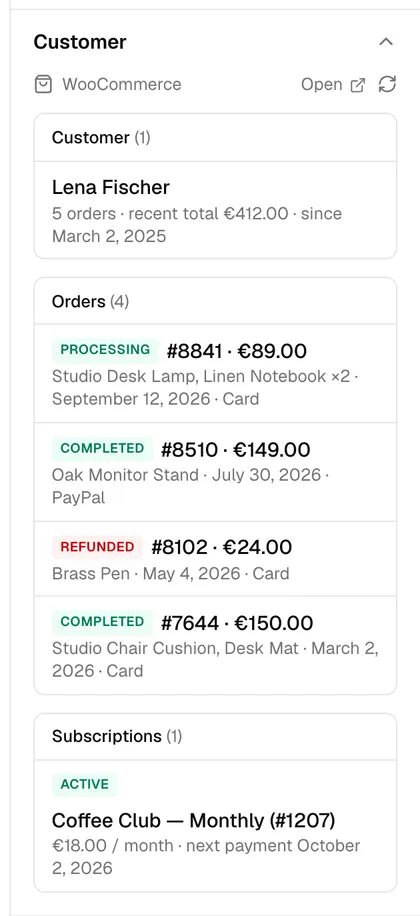
| Section | Fields |
|---|---|
| Customer | Name, number of orders, recent total, customer since. Links to the user in wp-admin. |
| Orders | Order number, total, status, products, date, payment method. The 8 most recent, newest first; collapsed when there are more than 3. Each links to the order. |
| Subscriptions | Products, status, total, next payment date. Needs WooCommerce Subscriptions. Each links to the subscription. |
Status badges follow WooCommerce: completed and processing are green,
pending and on-hold amber, refunded, cancelled and failed red.
What the AI can answer
Section titled “What the AI can answer”By default, nothing — the record is for your team. To let the AI use it, open Integrations → Customer data in the dashboard and turn on Let the AI answer account questions. From then on, when the visitor is logged in to your WordPress site, the plugin signs their identity and the AI gets the same record. Questions it can then answer from real data:
- “Has my order shipped?” — status and date of the latest order
- “What did I order last time?” — products and totals
- “When is my next payment?” — from the subscription’s next payment date
Visitors who are not logged in get normal answers from your content. A visitor cannot type someone else’s email into the chat and ask about their orders.
- Orders are looked up by the customer’s billing email. Guest orders with the same email are included.
- Amounts are shown in the store’s currency, formatted by WooCommerce.
- The record is cached for five minutes per email. Use the refresh icon in the panel to fetch it again.
- Add more sections (memberships, a CRM) with the
yamidoo_customer_sectionsfilter — see Customer data.