

Freemius
If you sell plugins or themes through Freemius, Yamidoo can show what Freemius knows about a visitor next to their conversation, and can, if you turn it on, let the AI answer a logged-in customer’s questions about their own licenses. The data lives in Freemius, not on your WordPress site, so this connector is set up in the dashboard alone — no plugin needed. Nothing is copied into Yamidoo: the record is fetched from Freemius when a conversation is opened, shown, and discarded. The general mechanism is described in Customer data.
-
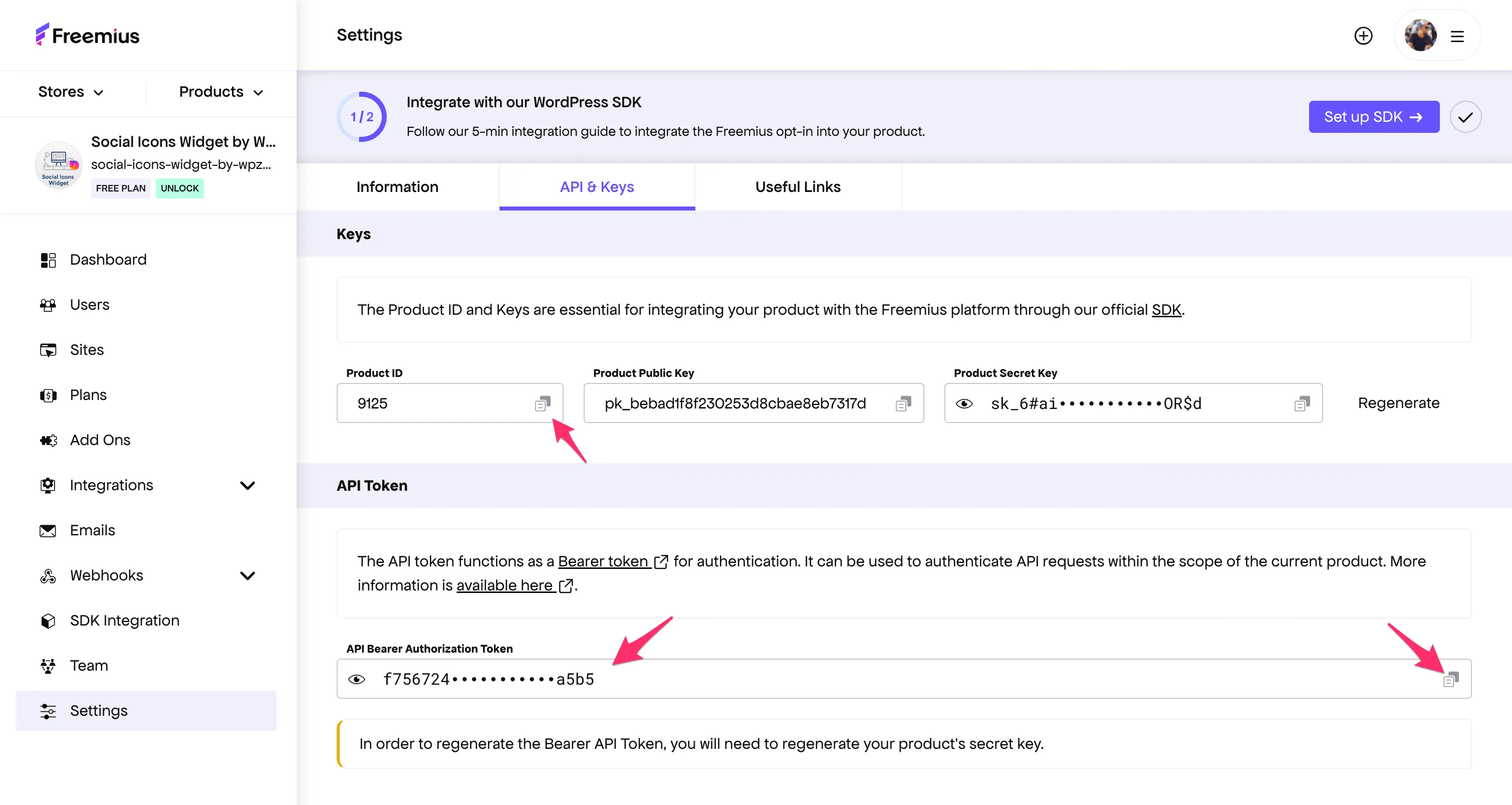
In the Freemius Developer Dashboard open the product, then Settings → API & Keys. Copy the Product ID and, further down, the API Bearer Authorization Token (the eye icon reveals it, the copy icon copies it).
-
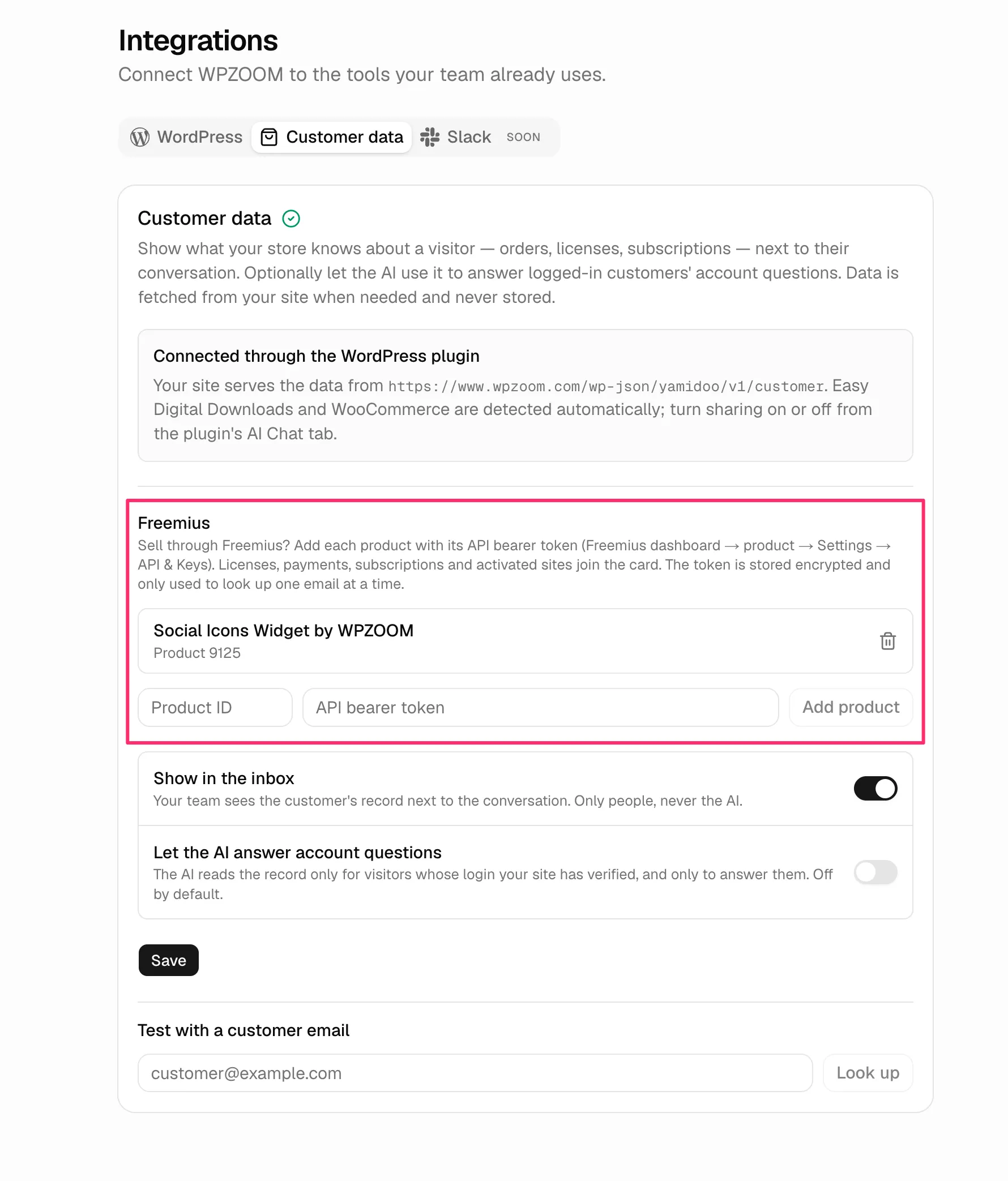
In Yamidoo open your project → Integrations → Customer data. Under Freemius, paste the Product ID and the token and click Add product. Yamidoo checks the token against the product right away and lists it by its Freemius title.
-
Repeat for each product you sell. Then use Test with a customer email at the bottom of the tab to confirm the card comes back.
The token is stored encrypted and is only ever used to look up one email address at a time. Remove a product with the trash icon next to it; nothing is kept in Yamidoo afterwards.
What the panel shows
Section titled “What the panel shows”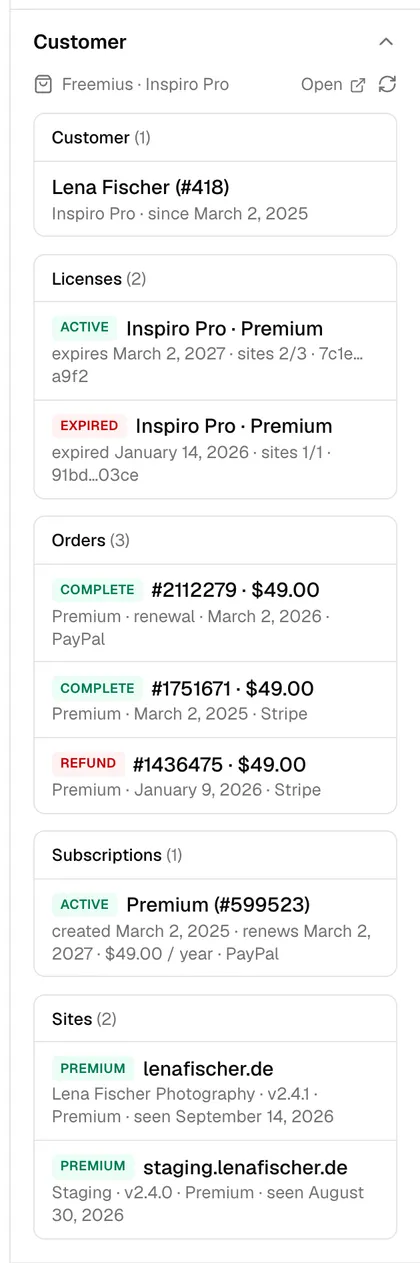
Sections come from the Freemius API for the product and are merged into one card, titled after the product. With several products, each product’s sections follow one another.
| Section | Fields |
|---|---|
| Customer | Name and user ID, the product, customer since, and a note if the email is not verified. Links to the user in Freemius. |
| Licenses | Product and plan, status, expiry date or lifetime, activations used of the limit, the license key. Each links to the license. |
| Orders | Payment ID, amount, plan, whether it was a renewal, date, gateway. Newest first; collapsed when there are more than 3. Refunds and disputes are marked. Each links to the payment. |
| Subscriptions | Plan, status, created date, next renewal or cancellation date, amount and billing cycle, gateway. Collapsed when there are more than 3. Each links to the subscription. |
| Sites | The sites the product is activated on: host, product and version, plan, last seen. Uninstalled sites are hidden; collapsed when there are more than 3. Each links to the install. |
Status badges: active licenses and complete payments are green;
expired and cancelled licenses, refunds and cancelled subscriptions are
red; a subscription still in its trial shows trialling. Sites show premium,
free or inactive.
What the AI can answer
Section titled “What the AI can answer”By default, nothing — the record is for your team. To let the AI use it, turn on Let the AI answer account questions on the same tab. The AI then gets the record only for visitors whose login your site has verified: the WordPress plugin signs the logged-in user’s email, so a visitor cannot type someone else’s address into the chat and ask about their licenses. Questions it can then answer from real data:
- “When does my license expire?” — status and expiry of each license
- “How many sites can I still activate?” — activations used of the limit
- “Did my renewal go through?” — the latest payment and the subscription’s status
- “Which plan am I on?” — the plan on the license and subscription
Visitors who are not logged in get normal answers from your content.
- Customers are looked up by the email on their Freemius user account. A customer who bought under a different address will not match.
- Amounts are shown in the currency Freemius recorded for the payment.
- The record is cached for five minutes per email. Use the refresh icon in the panel to fetch it again.
- Freemius can be combined with a WordPress store: an Easy Digital Downloads or WooCommerce connection through the plugin and any number of Freemius products all land on the same card.