





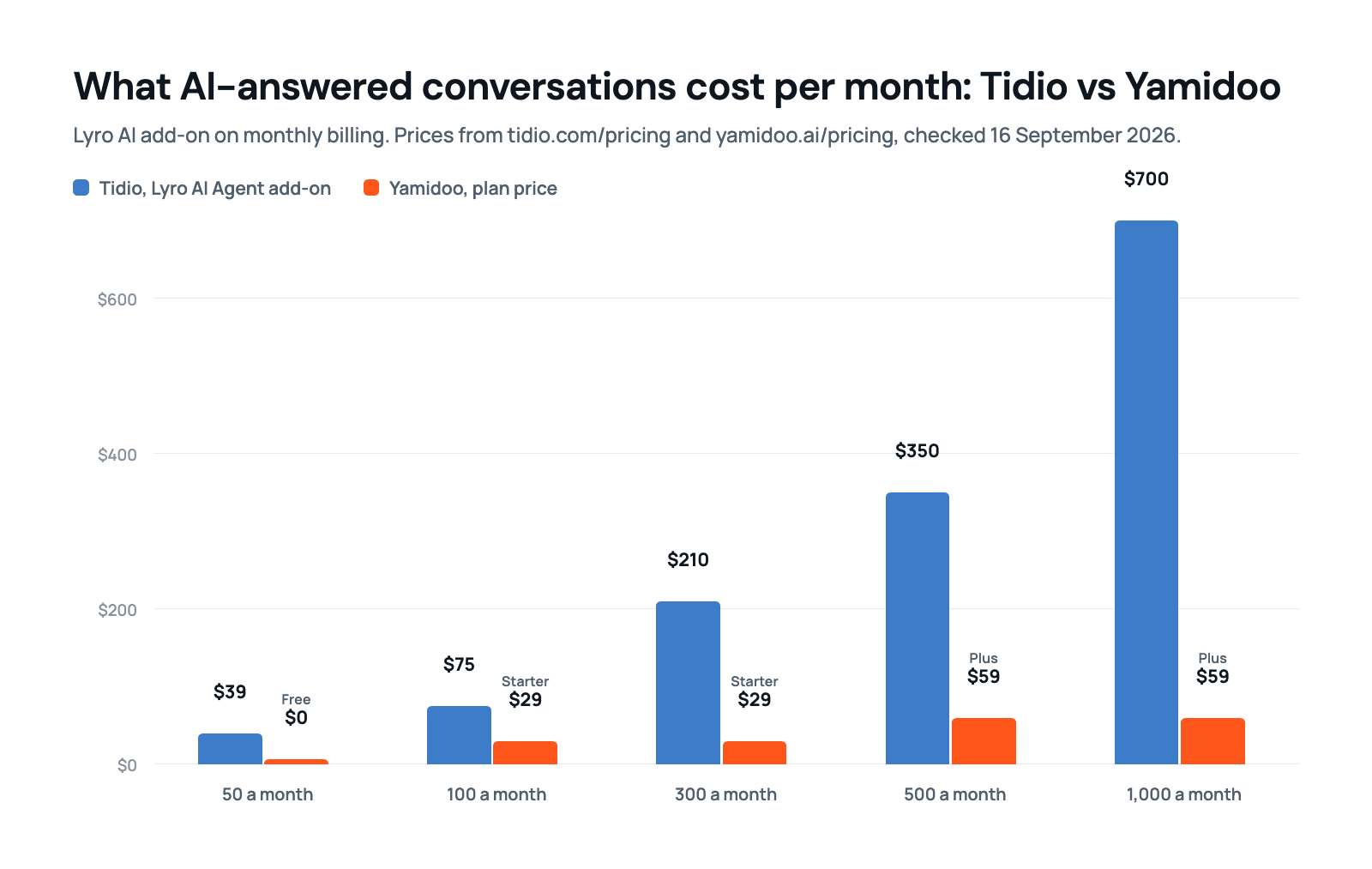
Stay with Tidio if you answer customers on several channels, or you run a Shopify store and want proactive chat campaigns. Choose Yamidoo if your site mostly needs one thing: answering the questions visitors already ask, from the pages you already wrote, with a person able to step in. At 300 AI-answered conversations a month, that is $210 against $29.
Tidio is a live chat and customer service suite: chat, tickets, email, Messenger, Instagram and WhatsApp in one inbox, rule-based chatbot Flows for sales, and Lyro, Tidio’s AI agent, sold by the conversation.
Yamidoo is an AI support chat built by WPZOOM: customer support answers from your own pages, with the source linked under every one and a person one click away. AI answers are on every plan, the free one too.
The short version
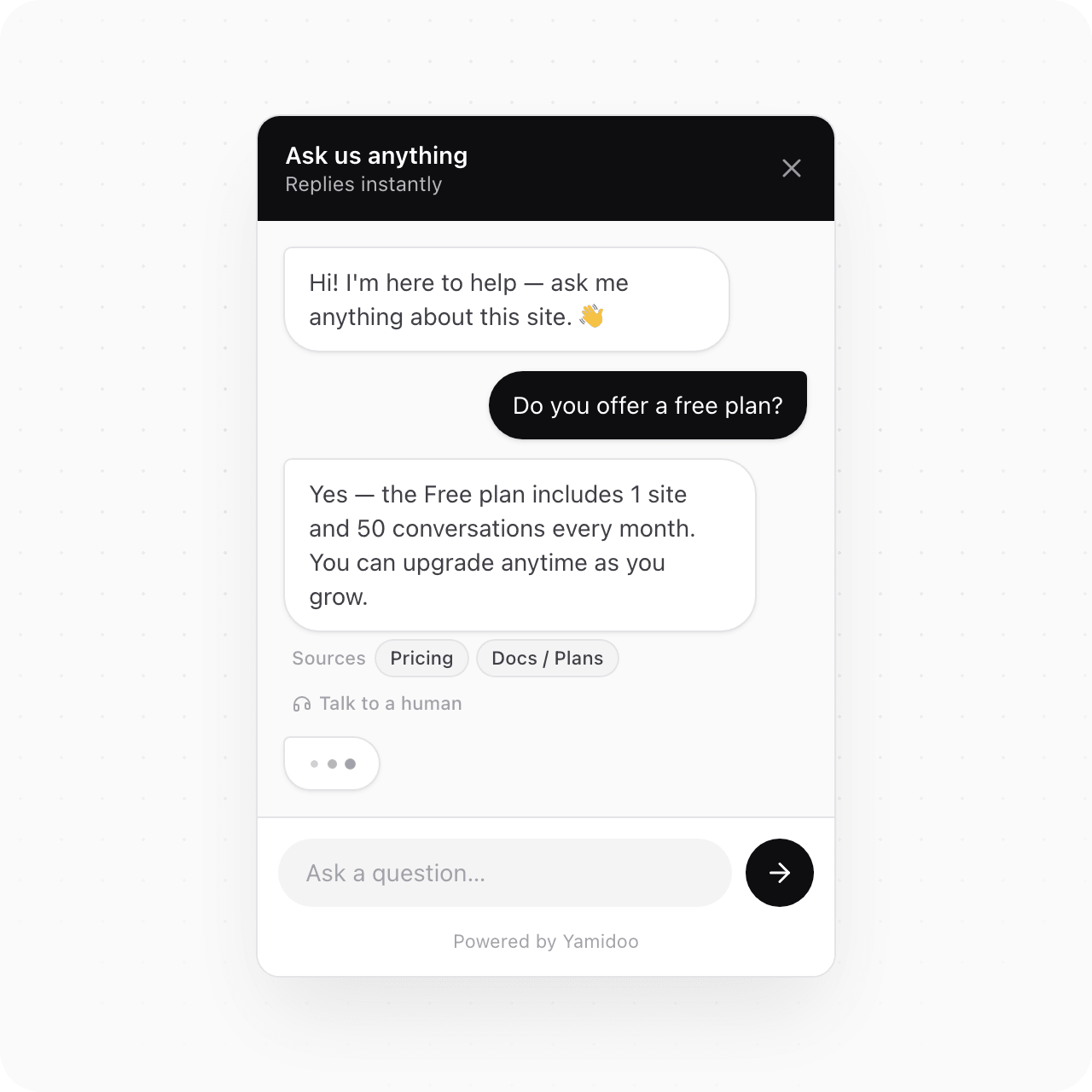
- Price. On Tidio, the AI is a separate meter. Every account gets 50 Lyro conversations once, for life. After that, 50 a month cost $39 and 300 cost $210. On Yamidoo, the Free plan includes 50 AI conversations every month, and $29 buys 300.
- Shape. Tidio is a help desk with an AI add-on. Yamidoo is an AI support chat with live human takeover built in, and nothing else: no ticketing, no WhatsApp, no email inbox.
- Sources. Every Yamidoo answer links the page it came from. Tidio’s pages do not say whether Lyro shows its sources.
- WordPress. Both install on WordPress with a plugin. Tidio’s has 70,000 active installs and years of reviews. Ours is new, from a company whose WordPress themes and plugins run on 250,000+ sites.
Yamidoo vs Tidio
| Tidio | Yamidoo | |
|---|---|---|
| Cheapest paid plan | Starter, $29 a month: 100 human-replied conversations, AI extra | Starter, $29 a month: 300 AI-answered conversations, human replies free |
| Free plan | 50 human-replied conversations a month, 50 AI conversations once, 10 seats | 50 AI-answered conversations every month, 100 pages, 1 seat, no card, no expiry |
| What you pay for | Human-replied conversations, plus AI conversations, plus Flows visitors | AI-answered conversations only |
| 300 AI conversations a month | $210 (Lyro add-on) | $29 (Starter) |
| 1,000 AI conversations a month | $700 | $59 (Plus) |
| Where the AI gets its answers | Your support content: website scraper, FAQ upload, Zendesk article import | Your pages, sitemap, pasted text and hand-written Q&A pairs |
| Does the AI show its source | Not stated on Tidio’s pages | Every answer links the page it came from |
| When the AI does not know | Forwards to a human agent | Says so and offers a person |
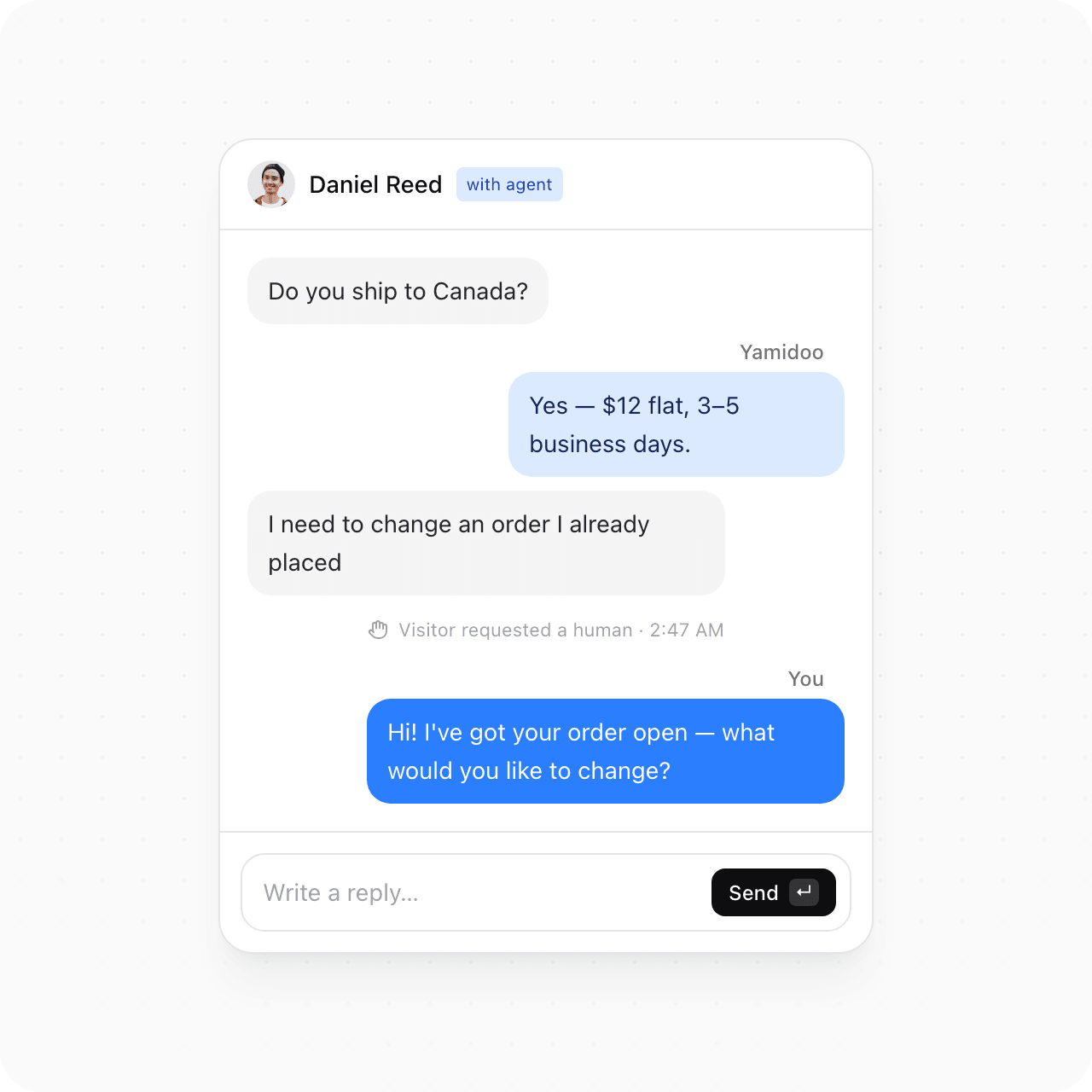
| Human takeover | Handoff rules; the agent replies in the inbox | Your team watches live and can take over mid-answer with a reply already drafted; the AI resumes when they leave |
| Channels | Website chat, email, tickets, Messenger, Instagram, WhatsApp | Website chat only |
| WordPress | Plugin with 70,000 active installs | Free plugin: one click to connect, no theme edits; WooCommerce and EDD orders, licenses and subscriptions next to the conversation |
| Remove the badge | $20 a month add-on | Included on Pro, $99 a month |
| Team seats | Up to 10 on self-serve plans | 1 on Free and Starter, 3 on Plus, 5 on Pro; extra seats $19 a month each, on request |
| Over the limit | Quotas refresh every 30 days; more volume means a bigger quota | We email you at 75%, 90% and 100%, then AI answers pause until the next period. No overage billing |
| Getting your data out | Contacts export to CSV in bulk; chat transcripts one conversation at a time | Transcripts by email, one conversation at a time. No bulk export yet |
| Trial | 7 days, no card, then Free | The Free plan is the trial, and it does not end |
| Apps | Desktop and mobile | Web dashboard |
Yamidoo plans and limits are on the pricing page; the full feature list is on features.
What Tidio costs in 2026
Tidio bills three things separately, all on its pricing page. A billable conversation is any chat, ticket, email or social thread that a human on your team replies to, counted once however many messages it holds. Replies from Lyro or from Flows do not count as billable. A Lyro conversation is any thread with at least one AI reply, also counted once. Flows are metered by visitors reached per month.
Tidio’s plans
| Tidio plan | Monthly billing | Annual billing | What it includes |
|---|---|---|---|
| Free | $0 | $0 | 50 billable conversations a month, 50 Lyro conversations one time, 100 Flows visitors a month, up to 10 seats, live chat and ticketing |
| Starter | $29 a month | $24.17 a month | 100 billable conversations, the same one-time 50 Lyro conversations, live visitor list, operating hours, basic analytics |
| Growth | from $59 a month | from $49.17 a month | 250 billable conversations, rising to $349 for 2,000; advanced analytics, permissions, automatic assignment, macros |
| Plus | $300 a month plus usage | $300 a month plus usage | Custom quotas, premium support, departments, custom branding, discounted usage rates |
| Premium | Contact sales | From 3,000 Lyro conversations, a guaranteed 50% Lyro resolution rate, pay per resolution |
Two more lines matter for a small site. Removing the “Powered by Tidio” badge is an add-on at $20 a month ($16.67 on annual billing). And there is a 7-day trial of every feature with no card, after which the account drops to Free.
Lyro AI conversations
The AI is bought on top of any of those plans, including Free:
| Lyro AI conversations a month | Price on monthly billing | Per conversation |
|---|---|---|
| 50, one time only | $0 | |
| 50 | $39 | $0.78 |
| 100 | $75 | $0.75 |
| 150 | $110 | $0.73 |
| 200 | $140 | $0.70 |
| 300 | $210 | $0.70 |
| 500 | $350 | $0.70 |
| 750 | $525 | $0.70 |
| 1,000 | $700 | $0.70 |
Tidio’s Lyro page advertises “just $0.5 per conversation”. On the self-serve pricing page the rate runs from $0.78 down to $0.70; the Plus tier at $300 a month is where “discounted usage rates” start.
Tidio’s pricing page also says Lyro “solves up to 67% of customer questions automatically”. That is Tidio’s figure and we have no way to check it. We do not publish a resolution rate of our own, because we do not measure one. What we do measure, on wpzoom.com, is how often somebody on our team had to step in: in 85% of conversations, nobody did. That is not the same measurement, and it is our own site.
The case for Tidio, and the case against
What Tidio does well
- Every channel in one inbox. Website chat, tickets, email, Messenger, Instagram and WhatsApp land in the same place, with desktop and mobile apps for the team. If your customers write on five channels, that is the product to buy.
- A mature WordPress plugin. 70,000 active installs, a 4.7 rating from 396 reviews, updated in September 2026. It has been through years of WordPress and PHP versions.
- Ten seats on every self-serve plan, including Free. A small team can share the inbox without paying per person.
- Flows. Rule-based chat paths that trigger on visitor actions, with a visual builder and templates for lead capture, quote requests and missed conversations. Yamidoo has starter questions and floating messages, not a flow builder.
- Guardrails on the AI. Tidio says Lyro “works only with the content and guidance you provide” and forwards the question to a human when the answer is not in your content. That is the right design, and it is the same principle we built on.
Why people look for a Tidio alternative
The facts below are on Tidio’s pricing page; the reading of them is ours.
- The AI is metered separately, and the free allowance never refills. Fifty Lyro conversations for the lifetime of the account is a demo, not a plan. Real usage starts at $39 a month.
- Three meters plus add-ons make the bill hard to predict. Human-replied conversations, AI conversations and Flows visitors each have a ladder, and the badge is a fourth line.
- You pay for a suite when you wanted a widget. Ticketing, video calls, Instagram and WhatsApp are worth paying for if you use them. If the goal is answering questions from your docs on your website, most of the feature table is weight.
- Per-conversation AI pricing punishes the sites that need it most. A site that gets the same 20 questions a day is exactly the site that should automate them. That is about 600 conversations a month, which on Tidio’s ladder falls between the 500-conversation rung at $350 and the 750 rung at $525.
How Yamidoo works
On wpzoom.com, where it has run since July 2026, it had handled 439 conversations by mid-September, 85% of them with nobody on our team stepping in, at an average reply of 7 seconds. To see what it would answer on your own site, run the free Support Readiness Scan: it reads your public pages and lists the questions it can already answer.
Where the answers come from
Answers from your own content. Yamidoo indexes your crawled pages, a sitemap, pasted text and Q&A pairs you write yourself, and answers visitors from that content only.
A source under every answer. Every reply links to the page it came from, so the visitor can check it and so can you. When it does not know, it says so and offers a person instead of inventing an answer.
Watch every conversation, step in when you want
A live monitor. It shows who is on the site and every conversation as it happens. You can watch an answer stream in real time.
Takeover in one click. Take over even mid-answer, with a reply already drafted for you to edit or send. Your name and photo replace the assistant in the widget header. Step away and the AI takes the thread back.
Where your data lives
No model trains on your content, ours or our AI provider’s. Workspaces are isolated at the database level. Data is stored in the United States on AWS under EU Standard Contractual Clauses, and Yamidoo is operated by WPZOOM BV in Amsterdam, so GDPR applies. IP addresses are kept for 90 days, you can delete a workspace or an account, and an erasure request overrides retention. The sub-processors are listed in the privacy policy.
Yamidoo on WordPress, WooCommerce and Easy Digital Downloads
Both tools install on WordPress with a plugin. Theirs is the established one, ours is new, and if a long track record on WordPress is what you are buying, buy theirs. What the Yamidoo plugin does:
- One field, or one click. Install the plugin, paste your Site ID or click Connect in Settings, and the chat is live. No theme edits. Deactivate it and the widget is gone.
- Store data next to the conversation. On WooCommerce and Easy Digital Downloads, Yamidoo can show a logged-in customer’s orders, licenses and subscriptions beside the chat, so account questions get answered instead of forwarded. It is off until you switch it on.
- Caching plugins do not strip it. The plugin ships excluded from the usual caching and optimization tools, so the widget still loads where those are set aggressively.
- Free, with no Pro tier. The plugin itself costs nothing. Your limits live with your Yamidoo plan.
WPZOOM has built WordPress themes and plugins since 2008, they run on 250,000+ sites, and our free plugins have 100,000+ active installs on wordpress.org. Setup is on the WordPress integration page.
Moving from Tidio
Switching chat tools is mostly a question of what you lose on the way out.
Your contacts come out in bulk. Tidio’s contact list exports to CSV on every plan, the free one included. Select the contacts, click Export, download the file.
Your chat history comes out one conversation at a time. Tidio exports a transcript per conversation, from the three dots menu in the Inbox. Its help center is direct about the limit: “At the moment, you can download only one transcript at a time. We don’t have the option to batch-download multiple transcripts.” If those transcripts matter to you, export the ones you want before you close the account.
Yamidoo imports none of it. There is no migration tool and no Tidio connector. Yamidoo answers from your pages, your sitemap, text you paste and Q&A pairs you write, so it does not need your old conversations to start working. Your knowledge base is the site you already have.
Open conversations stay where they are. Nothing moves between the two tools. Finish the threads that are open in Tidio, then change the widget over.
Take as long as you want. The Yamidoo Free plan needs no card and does not expire, so you can index your site and read the answers it gives before you take Tidio off the page. Switching is one field on WordPress or one script tag. Leaving is deactivating the plugin.
Other Tidio alternatives and competitors
For some sites neither Tidio nor Yamidoo is the answer. What the other Tidio competitors charge:
- Crisp, if you want a shared inbox and website chat at one flat price per workspace rather than per seat. Free for 2 seats with no AI credits, then $45 a month (Mini), $95 (Essentials) and $295 (Plus), each with a small AI credit allowance included.
- tawk.to, if free matters more than anything else. Its live chat is free and its automation page advertises AI agents as free forever. It publishes no price list, so check what the paid add-ons cost before you commit.
- Chatbase, if you want an AI-only bot and have nobody to take over. It bills message credits, not conversations: free for 50 a month, $40 (Hobby) for 700, $150 (Standard) for 4,000. A person can only pick up a conversation from Standard, where the help desk arrives.
- Intercom, if you are a support team with a budget for a full platform. Seats start at $19 a month on Essential, $85 on Advanced and $132 on Expert, and Fin, its AI agent, is charged on top from $0.99 per outcome. Fin can also be bought on its own, without seats, for a help desk you already run.
Which one is for you
When to stay with Tidio
- Your customers write on WhatsApp, Instagram, Messenger or email and you want one inbox for all of it.
- You need ticketing, live video calls or a mobile app for your agents.
- You run a Shopify store and use Flows for proactive sales messages.
- Your team is bigger than five and the ten free seats matter more than the AI price.
When Yamidoo fits better
- Most of your support is the same questions your site already answers.
- You want AI answers on the free plan, every month, with no card.
- You want to see conversations live and step in yourself, then hand back.
- Your site runs WordPress, WooCommerce or Easy Digital Downloads.
- You want one bill you can predict: conversations, not seats, meters and add-ons.