



Easy Digital Downloads store integration
Yamidoo for Easy Digital Downloads
Your team sees a customer’s licenses, orders and subscriptions right next to their conversation. Switch it on and logged-in customers can ask the AI about their own license and get the real expiry date. Part of the free WordPress plugin, nothing extra to buy.
- Included in the free plugin
- Software Licensing and Recurring
- Nothing copied out of your store

- Requires
- EDD 3+
- Plugin
- Yamidoo for WordPress
- Price
- Included, free
- Data stored
- None
What it does
The customer record, where you reply
- Licenses with status, expiry, activations used and the key itself
- Orders with status, total, products, date and gateway; subscriptions with renewal dates
- Every row links to the license, order or customer in your EDD admin
“When does my license expire?” answered on the spot
- Opt in, and the AI reads the same record when a logged-in customer asks about their account
- License status and expiry, activations left, what a renewal covers
- Anonymous visitors get normal answers from your content, never someone else’s data
Fetched on demand, never stored
- Yamidoo asks your site for one customer at a time, only when a conversation is opened
- Every request is signed with a secret only your workspace holds
- The AI is off by default; opt in and it uses the record only for logins your site has verified
On by default when you connect
- Connect from the plugin and the store integration switches itself on
- Software Licensing and Recurring Payments are picked up automatically when present
- Works even if your theme adds the widget itself
What your team sees
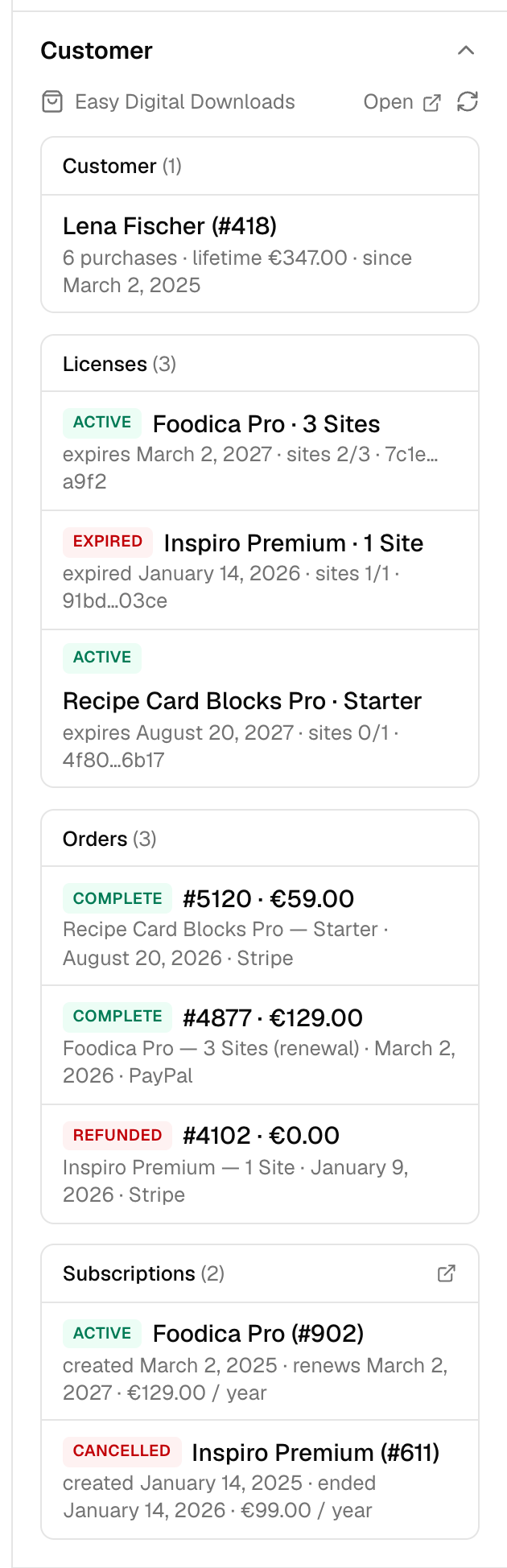
Open a conversation with a known email and the customer record is in the sidebar, exactly as your store has it. Each row links back to your admin.
- Customer
- Name, purchase count, lifetime value, customer since
- Licenses
- Product and price option, status, expiry or lifetime, activations used of limit, key — the 8 most recent (Software Licensing)
- Orders
- Order number, total, status, products, date, gateway — the 8 most recent
- Subscriptions
- Product, status, created, renewal or expiry date, amount and period — active first (Recurring Payments)
…and what the AI can answer, if you let it
The AI is kept out by default. Switch it on and, for a customer who is logged in to your site, it reads the same record. An example, with a made-up customer:
Is my Foodica license still active, and how many sites can I use it on?
Yes — your Foodica Pro license (3 Sites) is active until March 2, 2027. It is activated on 2 of 3 sites, so you have one activation left. It renews automatically through your subscription; you can manage that from your account page.
Two clicks, no keys to copy
The store integration lives inside the WordPress plugin. Connect once and it is on.
- 1
Install the Yamidoo plugin
In wp-admin go to Plugins → Add New Plugin, search for “Yamidoo”, then Install and Activate.
- 2
Connect to Yamidoo
Open Settings → Yamidoo and click Connect. Sign in or create a free account and you are sent straight back — EDD is detected and customer data is switched on.
- 3
Open a conversation
Any conversation with a known email now shows the Customer panel. Want the AI to answer license questions too? Flip the switch under Integrations → Customer data.
Already adding the widget from your theme? Keep the widget toggle off in the plugin; the store integration works on its own. Details in the docs.
Your site already has the answers
Yamidoo just puts them in front of the person asking. One script tag, free to start, no credit card.